Your KNX & Control4
expert. Meet Cody.

Tell Cody what you need. He helps you turn your KNX project into a Control4 integration, with less manual setup and more confidence.

Built for integrators. Powered by AI. Working with your project.

Cody, the CoduWorks robot, waving hello
Hi, I’m Cody.What are we building today?

See what Cody can do.

From KNX datato Control4 devices.

Lights, blinds, keypads, contacts, relays and sensors. Ask Cody to build whole rooms at once, review the proposal and watch your project take shape.

Cody proposes 36 devices across 6 rooms. After approval, the Codu project fills with lights, blinds, keypads, contacts, relays and motion sensors. The camera travels into Composer, where the same 36 devices are visibly created in the System Design tree and List View from the imported project. Illustrative sample with condensed timing.

Get more fromevery installation.

Find useful functions you haven’t added yet. Cody spots contacts, relay outputs and motion sensors in your KNX project and helps you bring them into the configuration.
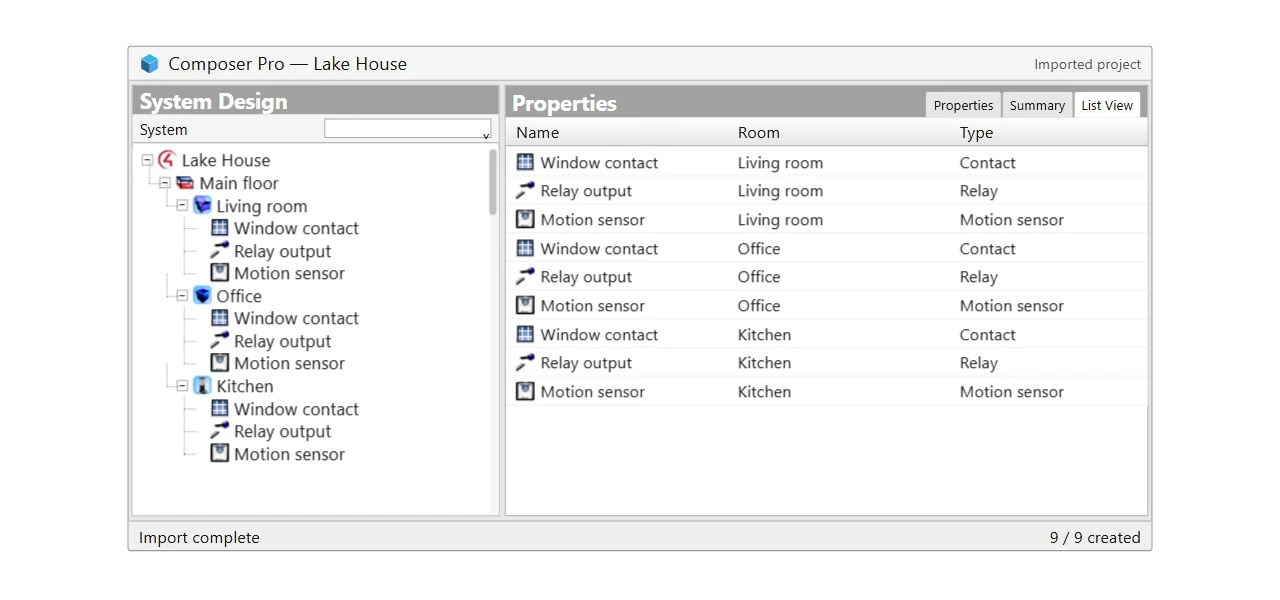
Discover with Cody

Cody finds 9 unused functions: 3 contacts, 3 relays and 3 motion sensors. After approval, the devices appear in their rooms with their KNX signals. The camera then travels into Composer, where those same nine devices appear in their rooms as the imported configuration is applied. Illustrative sample with condensed timing.

A change of plan.A simple request.

Reorganise whole groups with one request. Move lights, keypads, sensors and more to another room while keeping their KNX connections in place.
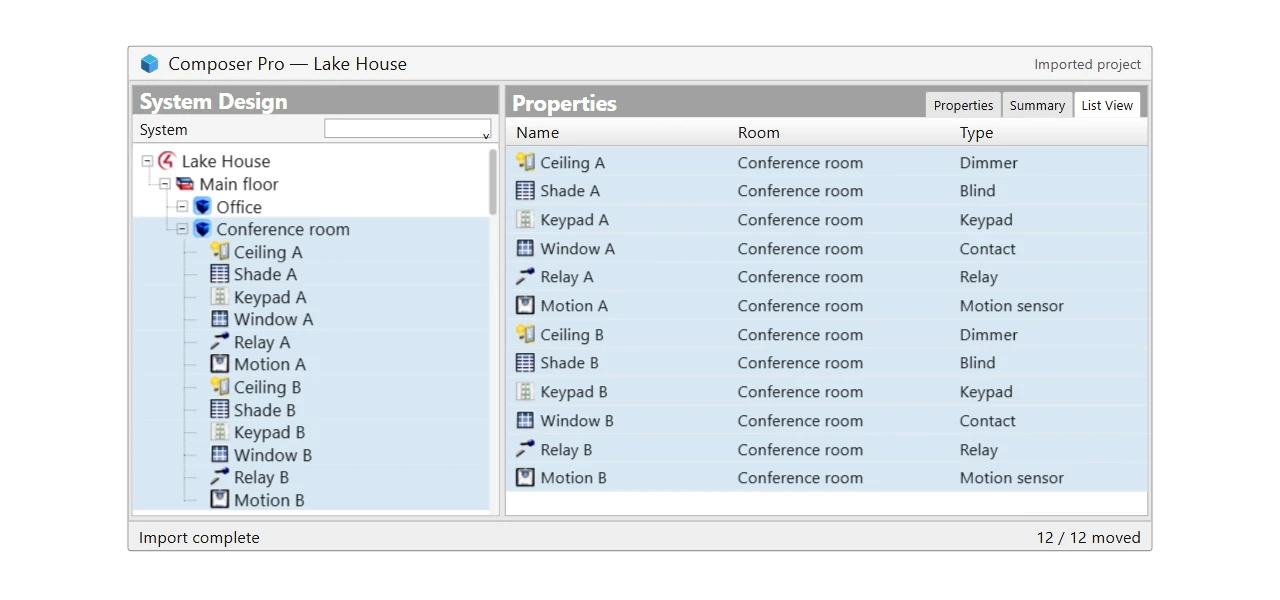
Make changes with Cody

Cody moves 12 devices of six different types from Office to Conference room. The same device cards travel together, their room connections change and the counts update from 12 to 0 and 0 to 12. Their KNX connections remain in place. The camera continues into Composer, where the same devices move between room branches and the Room column updates automatically from the imported configuration. Illustrative sample with condensed timing.

A second pair of eyes.Across your project.

Spot missing connections across different device types. Review Cody’s suggestions and apply the changes together, with a clear view of what was updated.
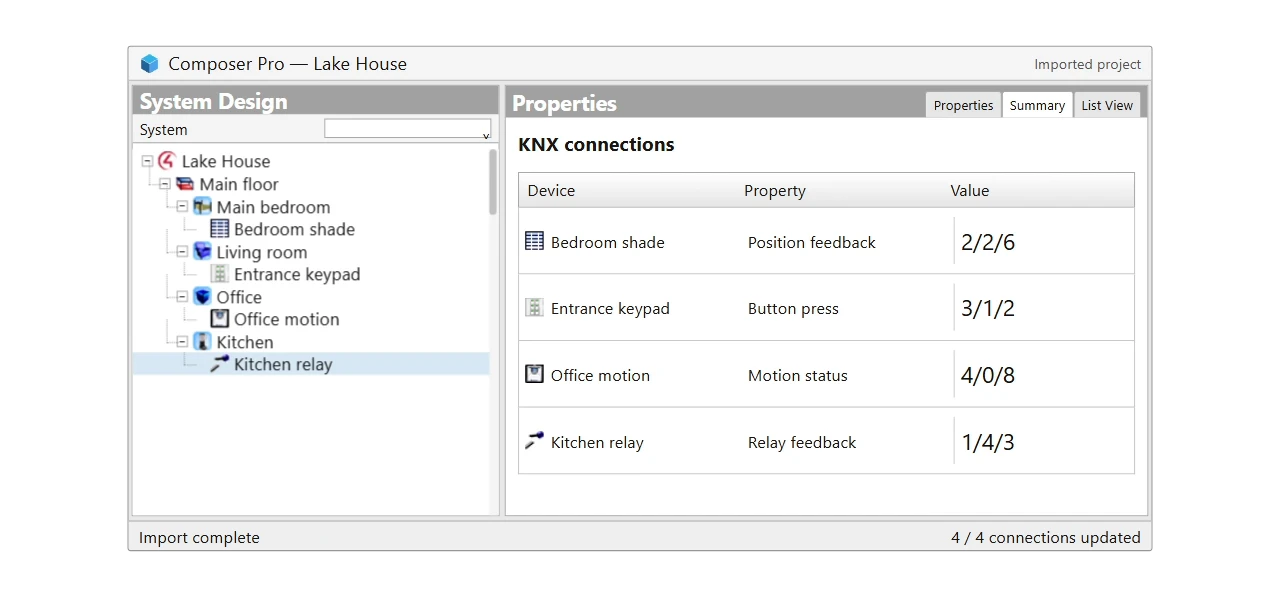
Review with Cody

A review of an illustrative 36-device project finds four missing connections on a blind, keypad, motion sensor and relay. After approval, the suggested KNX addresses become connected one by one. The camera continues to Composer and shows the same four values updating from the imported configuration. Final installation testing still happens on site. Illustrative sample with condensed timing.


CONSEXTO

24 hours planned.
Done in 2.

91.7%

less time than estimated

“Adding the correct drivers without the fear of writing the wrong group addresses.”
Pedro RodriguesCONSEXTO
Cody with his arms crossed
“What else could we do with this project?”

Expert help.
Your decisions.

Guidance for your actual project.

Cody works with your imported KNX data, so his suggestions relate to the installation you’re integrating.

Explain the result you want.

“Create the living room lights.” “Move these devices.” Ask naturally and let Cody help with the configuration.

You make the final call.

Review the proposal, approve the changes and keep building. Your expertise stays at the centre of every integration.

Good questions.

Explore the documentation
What is Cody?

Cody is your AI integration expert inside KNX to Control4 AI Assistant. He works with your KNX project to help you create Control4 devices, discover useful functions, make changes and review the setup.

Can I just ask in my own words?

Yes. Ask for the result you want: create the living room lights, move devices to another room or check the project. Cody uses your project context and asks for clarification when it is needed.

What can Cody help me create?

Cody helps with supported lights, blinds and other KNX functions, and can discover possibilities such as contacts, relays and generic measurements. Support depends on your KNX data and the driver’s capabilities. Thermostats require a suitable template from a tested setup.

Am I still in control of the changes?

Yes. In approval mode, you review and confirm proposed changes. You can inspect and edit devices in the visual workspace at any time. Always review the result and test the installation on site.

Do I still use ETS and Composer?

Yes. Import your ETS project into the platform, work on the Control4 configuration with Cody, then export and continue in Composer with the CoduWorks driver.

How do I get started?

Open the platform, create your account and complete your dealer details. Once your account is approved, import your KNX project and start working with Cody. Already have an account? Just sign in.

Cody smiling

Your next integration.
With Cody on your side.

Bring your KNX project. Get expert help taking it into Control4.

Create your account and complete your dealer details.
Already registered? Sign in and open your project.